Battlemania Docs
HOW CAN WE HELP YOU?
Getting Started
Welcome To BattleMania
We would like to thank you for purchasing BattleMania Tournament Android Mobile Application + Admin Panel + Website!
We are very pleased that you have chosen BattleMania for your tournament app & website, you will be never disappointed!
Before you get started, please be sure to always check out this documentation. We outline all kinds of good information, and provide you with all the details you need to use BattleMania.
If you are unable to find your answer here in our documentation, we encourage you to contact us through our chat system with your site CPanel or FTP details. We’re very happy to help you and you will get reply from us more faster than you expected.
Thank you, we hope you to enjoy using BattleMania!
package included
- 1. BattleMania tournament android mobile application
- 2. BattleMania admin panel
- 3. BattleMania website
Requirements for Website & admin panel
You need to agree the following requirements.
- PHP 7.0 or higher.
- MySQL 5 or higher.
Recommended PHP Configuration Limits
Many issues are all related to low PHP configuration limits. The solution is to increase the PHP limits. You can do this on your own or contact your web host and ask them to increase those limits to a minimum as follows:
- max_execution_time 300
- memory_limit 64M
- post_max_size 28M
- upload_max_filesize 12M
- CURL enable
please check that in info.php file
Installation Video
Manual Installation
BattleMania manual installation is easy with below five steps:
1. Create folder(Name should be as you want) inside your local server(if xampp then in htdocs or if wamp then in www). Then unzip the package. There will be upload folder, Copy all files and folder inside upload folder and paste to created folder.
2. Create mysql database and import battlemania.sql from unzipped package. Follow below steps to create and import database :
- Under Databases, enter database name(as you want) and click on create button.
- On the left, select the database that you have just created.
- Click Import in the top menu.
- Under File to Import, click Browse and select battlemania.sql file from unzipped package.
- Click Go at the bottom right to import the database file.
- When the database has been imported successfully, you should see a message at the top of the page similar to: Import has been successfully finished, ## queries executed.
3. Open the application/config/config.php file with a text editor and set your base URL.
4. Open the database.php file from root with a text editor and setup your database settings.
5. And you also need to setup database and URL setting for API. Open api/.env file with a text editor and setup your database settings and set base URL in APP_URL.
Installation via Ftp Client
BattleMania sever installation is also easy with below six steps:
1. Unzip the package and find upload folder.
2. Connect to your FTP server and upload all files from upload folder to public_html as below.

3. Create database (Click here for how to create) and import battlemania.sql from unzipped package. Follow below steps to import database:
- On the left, select the database that you have just created.
- Click Import in the top menu.
- Under File to Import, click Browse and select battlemania.sql file from unzipped package.
- Click Go at the bottom right to import the database file.
- When the database has been imported successfully, you should see a message at the top of the page similar to: Import has been successfully finished, ## queries executed.
4. Open the application/config/config.php file of server files with a text editor and set your base URL, then save & upload again.
5. Open the database.php file of server from root with a text editor and setup your database settings, then save & upload again.
6. And you also need to setup database and URL setting for API. Open api/.env file of server with a text editor and setup your database settings and set base URL in APP_URL, then save & upload again.
Login
Once you installed successfully you will access admin panel & website by below link :
- Website : http://localhost/xyz (where xyz – your project folder name) http://xyz.com (where xyz.com – your domain name)
- Admin panel : http://localhost/xyz/admin2020 (where xyz – your project folder name) http://xyz.com (where xyz.com – your domain name)
Note : After first login please change default password to your own password, And please create strong password.
Dashboard
BattleMania admin dashboard showing some brief information such as Total user, Total match, Received ordered amount, Withdraw amount, etc..
My Profile
From here you can manage profile settings, company setting, social setting.
Change Password
From here you can change your password any time. Just keep in mind, add strong password for security.
Pages
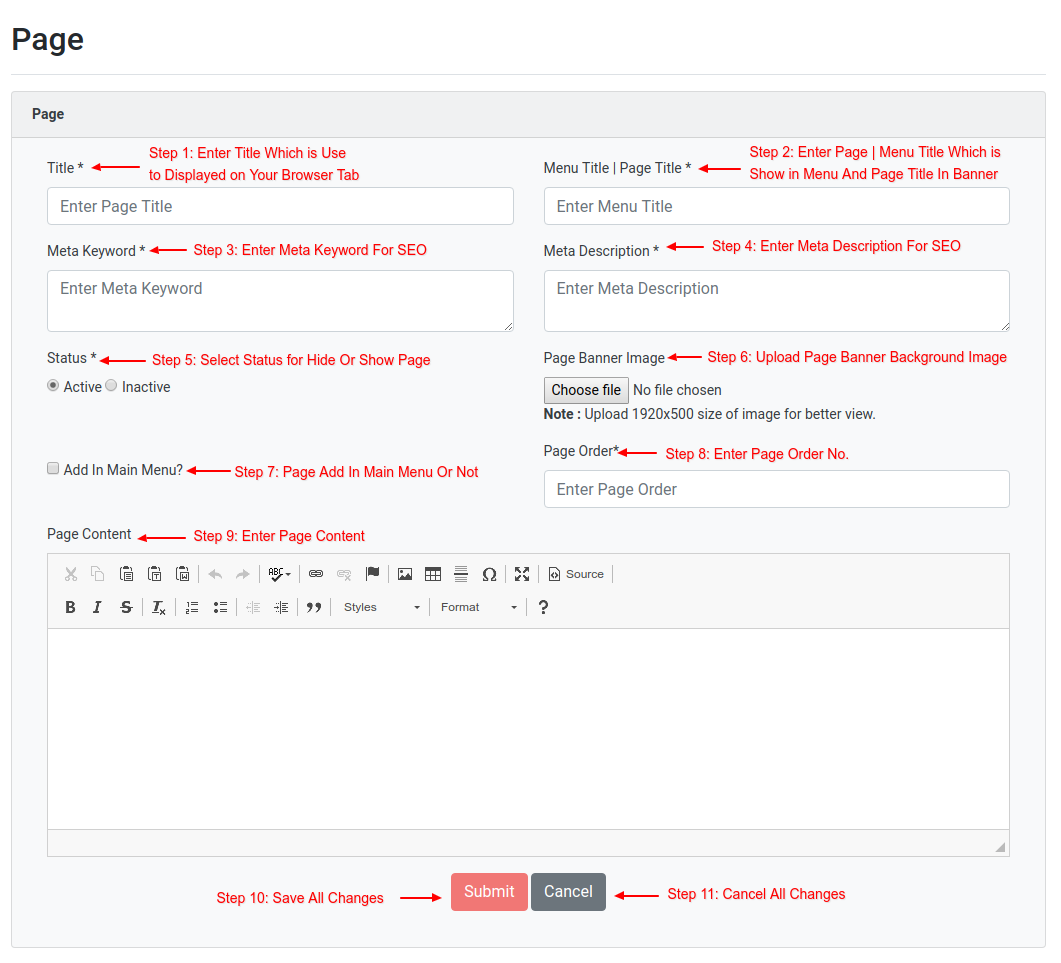
From here, You can manage your pages. You can create your own pages also as you want, There are already created some pages on that you can add or edit content as you want. you can also set that page as main menu or sub menu. all describe in detail in below screen shot.
Home Page setting
From here, you can manage your home page sections as below :
- 1. Main banner setting
- 2. App screenshots
- 3. Feature tab & features
- 4. How to play
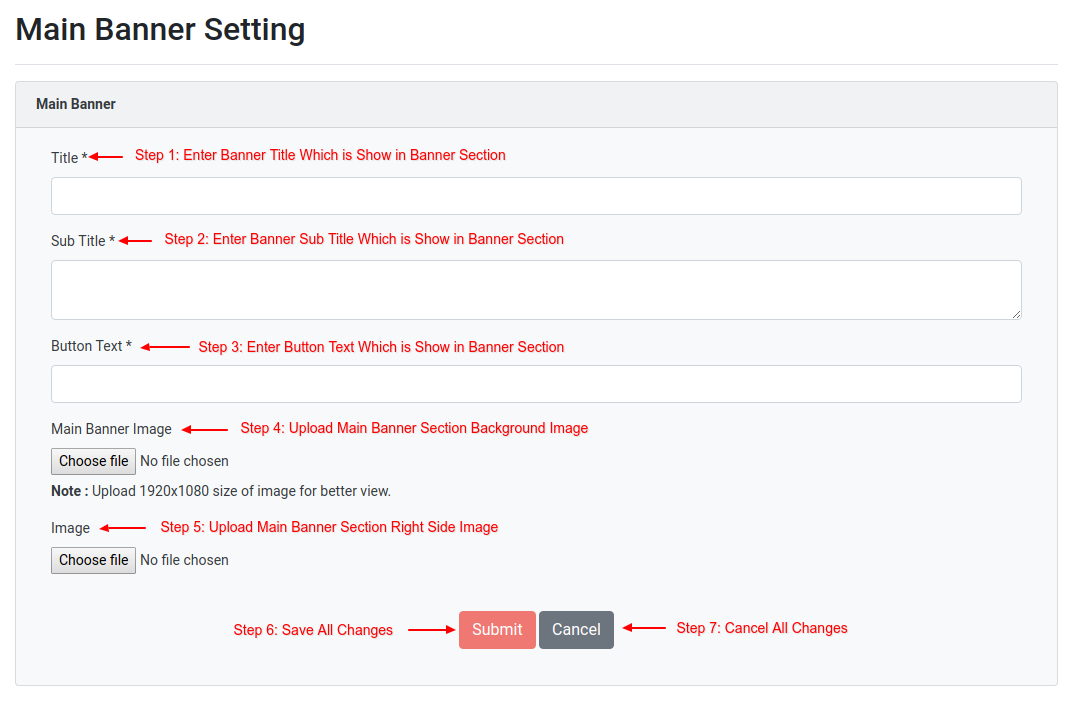
Main Banner Setting
From here you can manage banner section as below.

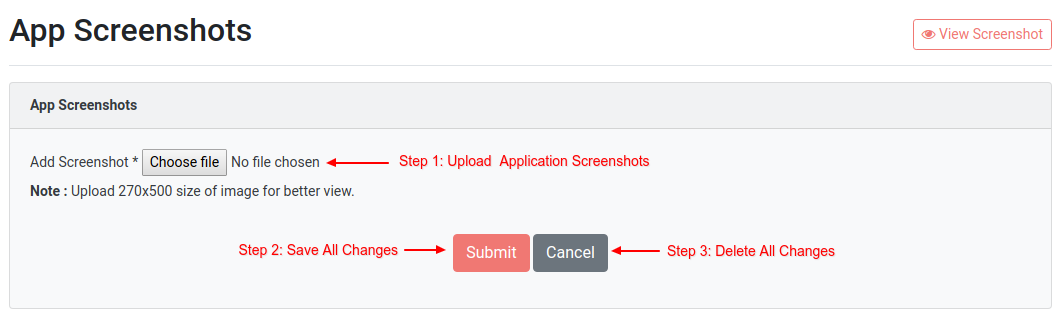
App Screenshots
From here, you can add, edit and delete application screenshots as you want. you can see as below :

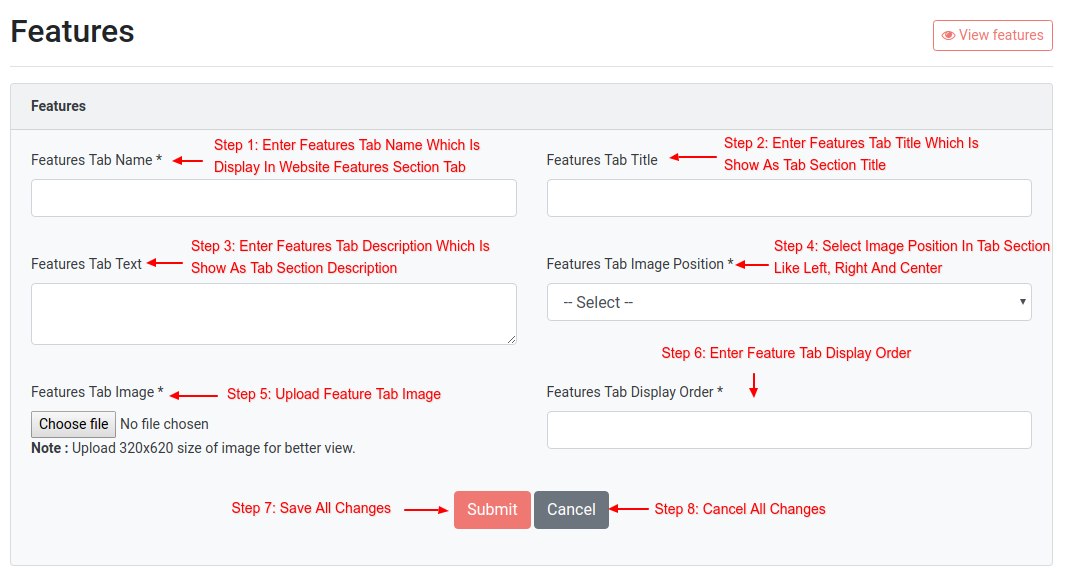
Feature Tab & Features
From features tab, you can add, edit and delete tab as you want. From features, you can add, edit and delete tab content. that you can see below.

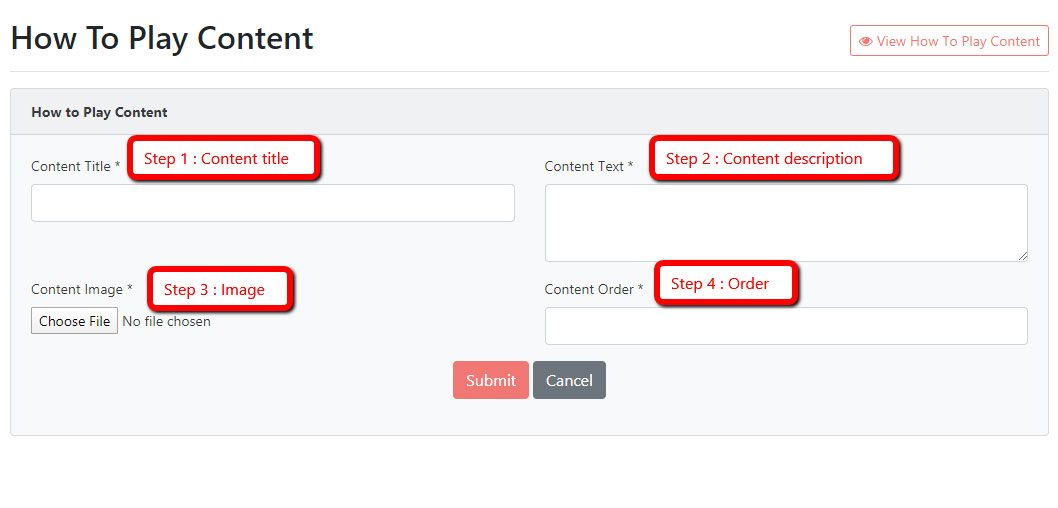
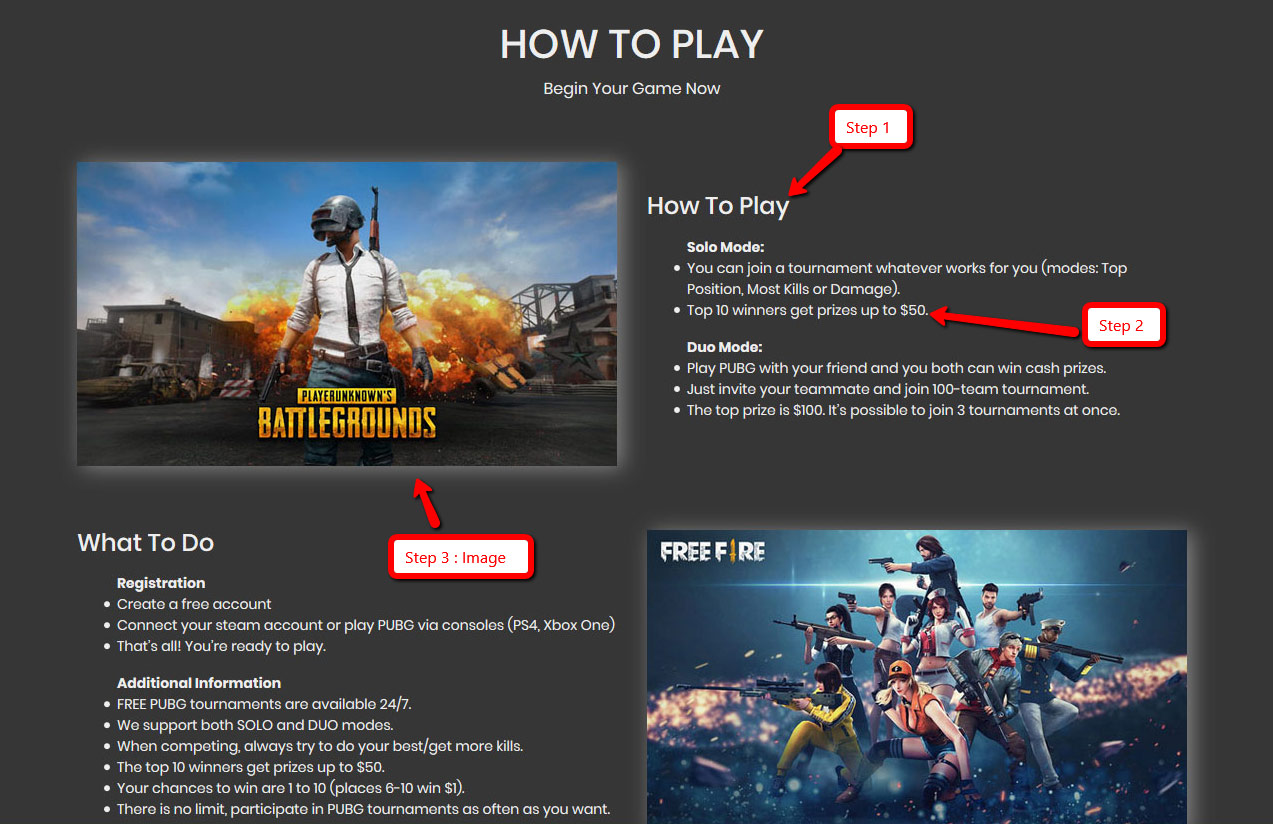
How To Play
From here, you can add, edit or delete section as you want. You can see in below.
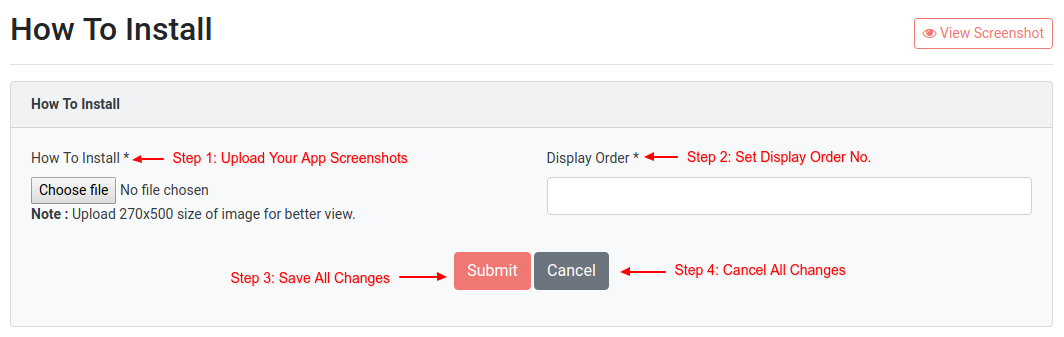
“How To Install” Screenshots
From here, you can set screenshots of how user can install app on their mobile.
Users
From here, You can manage your registered users. You can do Update user information, Delete user, Active or inactive user, Add money to user wallet. And you can see user wallet history, user statistics and referral income.
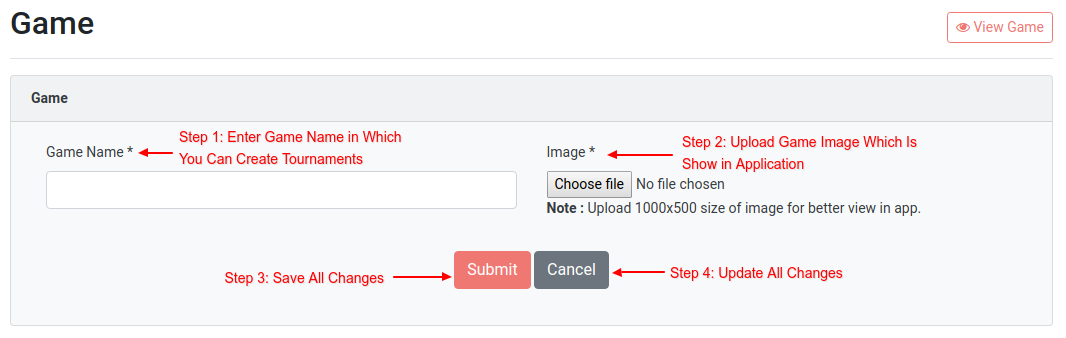
Games
From here, you can manage Add, Edit, Delete, Active/Inactive game Such as PUBG, FREEFIRE, PUBG LITE, COD, Fortnite..etc
Matches Or Tournaments
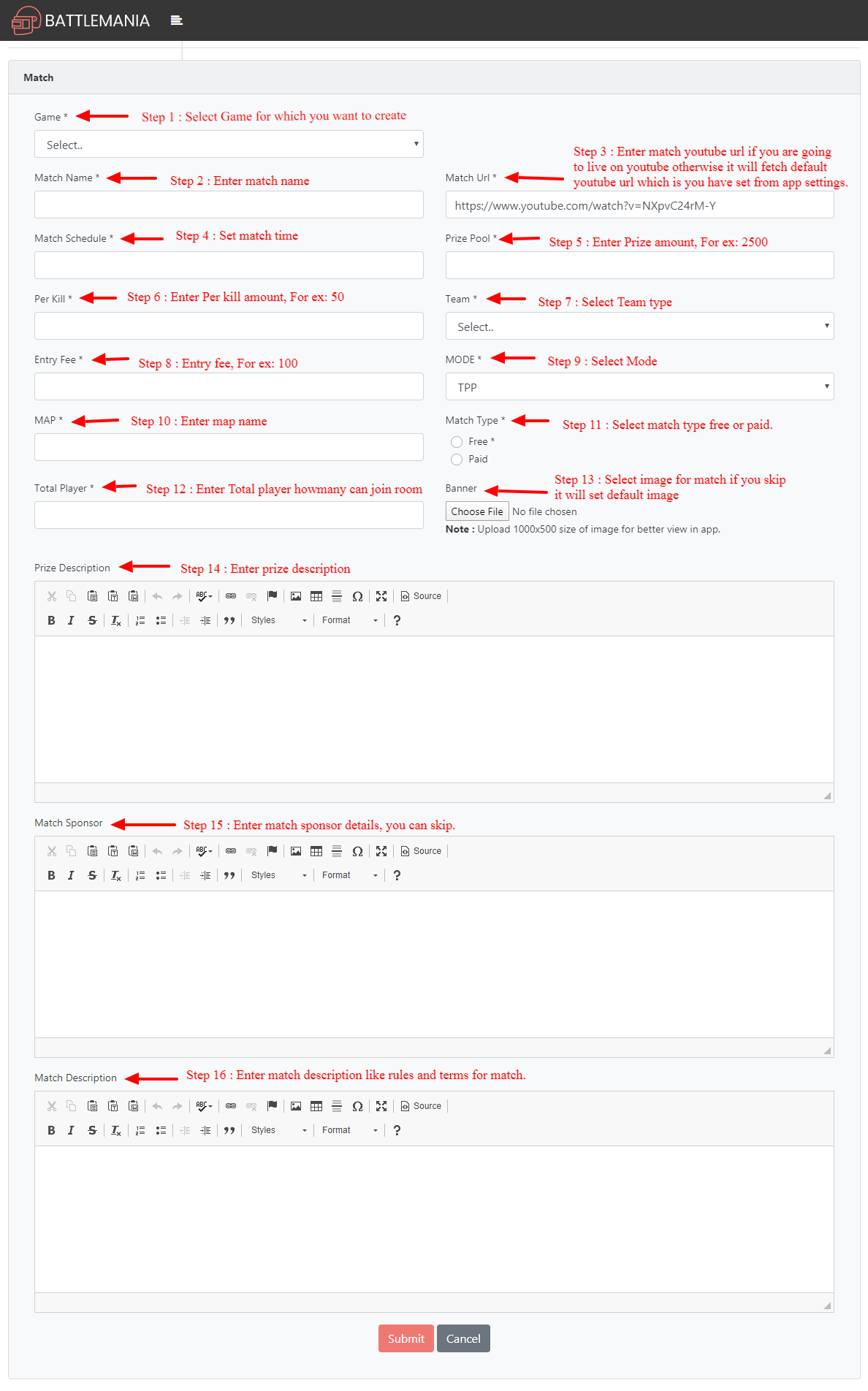
From here, you can create match or tournaments as you want for any game such as PUBG, FREEFIRE, PUBG LITE, COD, Fortnite..etc. So how you can create match that you can see in below screenshot.
Then you can also Edit, Delete, View joined members and their joined positions.
Money Order
From here, you can see order of user how are adding money to their wallet.
Withdraw Request
From here, you can see withdraw request which are requested by users. Once you have paid manually then you have to change status to paid from here.
Registered Referral & Joined Referral
In registered referral, you can see referral user list who earn amount by registered referral.
In join referral, you can see referral user who earn amount by join referral.
Setting
App Setting
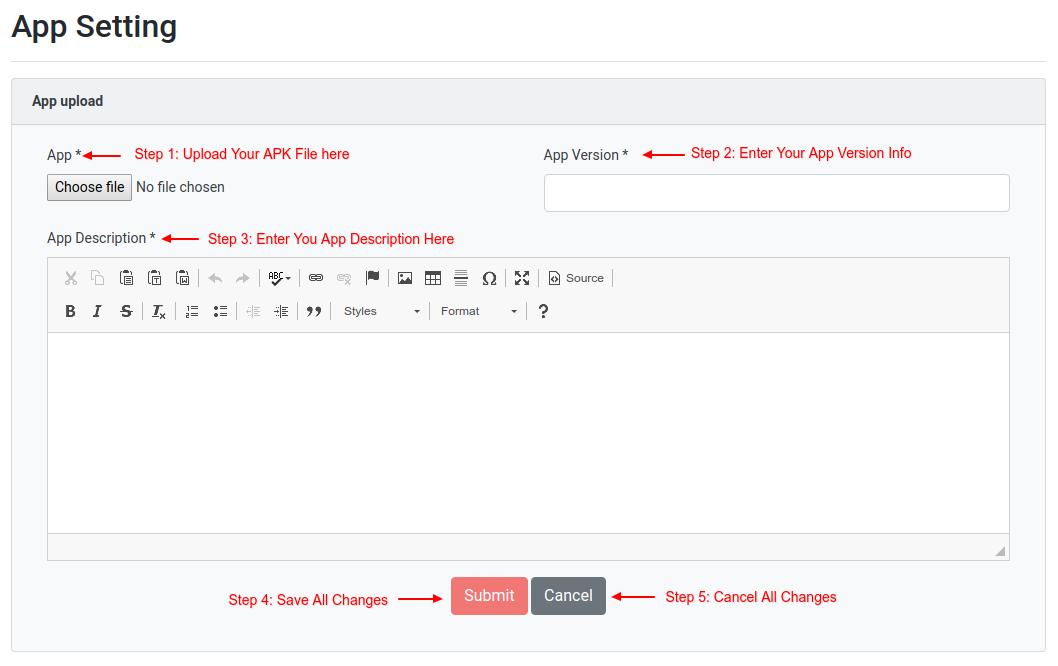
From here, you can update your mobile application settings.
App upload : When you have new version of your application you can upload from here. so user can download new version app from website and User will get notification for update app who already installed old version.
Other settings :
- Referral setting – From here, you can active/inactive referral function on application.
- Default Game Rules – From here, you can set default game rules.
- Match URL Setting – From here, you can set your default youtube video URL.
- Share Setting – From here, you can set share description which will show at when you are sharing your referral code to other user.
- Withdraw Setting – From here, you can set minimum withdrew amount, By this user can not withdrew less this amount.
- Deposit Setting – From here, you can set minimum deposit amount, By this user can not deposit less then this amount.
So settings explain in below screenshots also.

To activate firebase OTP, Login with Facebook, and Login with google
- Enter Firebase Api Key, Facebook App ID, Google Client ID on app setting page in admin.
As shown below

How to get Google Client ID
- open your project in firebase
- Go to Authentication tab->Sign-in method->Enable Google->Web SDK configuration->Web client ID
How to get Facebook App ID
- open your project in firebase
- Go to Authentication tab->Sign-in method->Enable Facebook
- That’s where you put the App id
How to get Fire base Api Key
- If you haven’t register a webapp then register web app in firebasecopy only Your web app’s Firebase configuration & Initialize Firebase from Add Firebase SDK & paste in FB pixel and Google Analytics Code filed at https://example.com/admin2020/appsetting/
- copy api key only
TimeZone Setting
- You can select particular timezone which you want to follow in your site.
Language Setting
- Select languages which you want
- Go to application/language/your_language. here your_language is folders which you select from admin panel for example application/language/english,application/language/arabic,etc.. and change language of alert_lang.php,information_lang.php,validation_lang.php files.
- Go to api/resources/lang/your_language. here your_language is folders which you select from admin panel for example api/resources/lang/en,api/resources/lang/ar,etc.. and change language of message.php file.
Currency Setting
From here, You can manage currency of application. you can create your own currency.
Payment Method
From here, you can manage your payment method. Currently we integrated two payment method. Paytm & Paypal.
Please update payment gateway details. Edit payment method as explain below
For Paytm, Follow instruction here to get credentials. Check section “Understanding account credentials” on that link.
For Paypal, Follow below steps
- Create paypal account – follow steps here
- Create a REST application.
- Get Credentials – follow steps here
You can see details in below screenshot also.


App Tutorial
From here, you can manage app tutorial video links.
- BattleMania Android Tutorial - https://youtu.be/nYk3r4wOBPs
- BattleMania API Change & Build Apk Tutorial - https://youtu.be/xL3rK0YAQTc
- How to add firebase in android and find onesignal appid and rest api key - https://youtu.be/dgJqXrRF6k8
- New Firebase Setup for Mobile Number OTP & Google Sign In – https://youtu.be/7qtytQk1m7c
- New Firebase Setup for Facebook Login – https://youtu.be/ud-V4-IAjlA
- How to change battlemania app icon and other images – https://youtu.be/9fWguz1zfZY
- How to setup AdMob in BattleMania – https://youtu.be/-Sf8_KjPpjM
Copyright and license
Copyright ©2019 All rights reserved | Battlemania All the Logos, Trademarks and Images belongs to Developer Infotech.